My Cart ⟩
⟨ AMT Electronics
⟨ Back to Blog

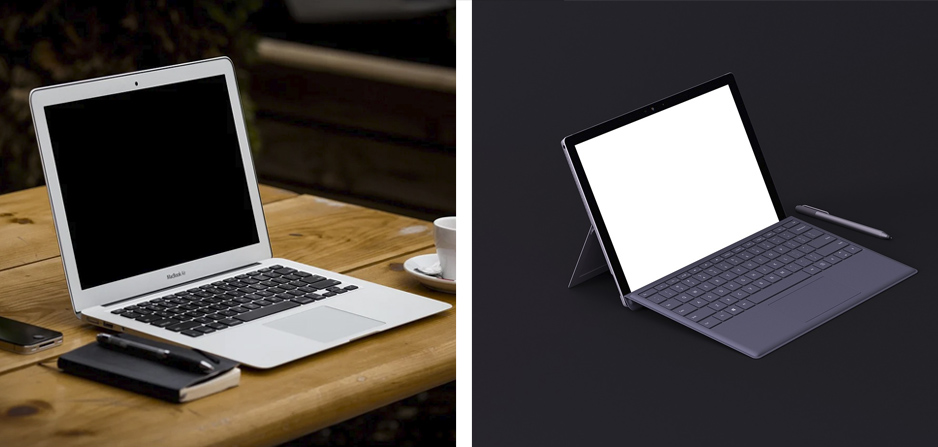
Comparison analysis between Microsoft Surface vs MacBook Air. Which one to buy?

It's no denying that Microsoft and Apple are the biggest names in the tech specs and users are always looking forward to their product. Recently Microsoft has launched the new Surface laptop and Apple announced MacBook Air M1 which is powered by a chip designed by Apple. In this post, we will take an in-depth look into their features and see how they compare

Design 

The MacBook  Air inherits the modern and sleek design of the Apple product line-up. It features an aluminium unibody chassis and ultra-thin profile which makes it lightweight and highly portable.  The monochrome colour and embossed Apple logo catch the eye at the first look. MacBook Air is only available in Space Gray, Silver, and Gold colours.

The look and design of Microsoft Surface are almost the same. It comes with a metallic enclosure and a Windows logo on top. Unlike MacBook Air, the enclosure of the Surface is not entirely made of Aluminum (Except the lid).  The enclosure material is polycarbonate material. composite resin reinforced with glass fibre and made up of 30% post-consumer recycled content. The result won't be as rigid as aluminium, but it is lighter.  

When it comes to colour and style Microsoft Surface is more versatile than MacBook  Air. With Microsoft Surface, you are free to choose from a wide range of colours. You can even order a surface laptop with premium colours such as Matte Black, Platinum, Sandstone, and Cobalt Blue.

Dimensions

MacBook Air comes in 11.97" x 8.36" W x 0.16\0.63" and weighs 2.8 pounds while the Surface laptop measures  12.1" L x 8.8" W x 0.57" and has almost the same. So two popular laptop models are comparable in the terms of dimensions and portability. You can put both in your backpack and carry them throughout the day without inconvenience.

Display

MacBook Air features a  13.3" display with a resolution of  2,560 x 1,600 and 227PPI. On the other hand, Microsoft Surface ships with a 13.5" PixelSense display designed with 2,256 by 1,504 resolution and 201PPI. 

The MacBook laptop also comes with some additional features that Microsoft Surface doesn't offer, specs like a P3 colour gamut display and 400 nits brightness that make a big difference in the user experience. So, in the terms of screen and display the laptop from Apple takes the lead.

Performance

Microsoft's laptop comes with either Intel Core i5 or Core i7 inside while the MacBook features Intel 10th Gen Core i3, i5 and i7. Recently Apple revealed a trump card over its rivals by introducing a newly designed M1 chipset. 

Designed with 5-nanometer technology, more than 16 billion transistors and a new set of instructions give the new MacBook Air a big edge over other laptops in the market including the Surface. 

When compared to Surface 4 the new M1 MacBook shows a fare better performance. The 8-core M1 MacBook Air is 3.5 times faster than Macs powered by Intel and it's able to render 4K videos in real-time.

Microsoft responded to Apple by designing a custom chipset for Surface Laptop 4 called AMD Ryzen 5 468oU. While Microsoft tried to improve the performance of Surface in the new chipset it cannot keep up with Apple's.

During the CPU performance test like Geekbench, the M1 Mac demonstrates far better performance. While Core i7-1185G7 Surface 4 laptop gained 1,428 points single-core tests. and 4,863 points on multi-core tests the results are far better for the M1 chipset. The MacBook Air M1 was managed to collect 1,693 points for the single-core tests and 7,195 on multiple cores.

So if you are looking for a laptop with exceptional performance you should go for Apple's MacBook Air with an M1 chipset.

Battery Life

Microsoft claims that the battery on Surface 4 will last for about 13 hours in typical usage while the expected battery life is 15 hours for the M1 MacBook. Thanks to the new architecture used in M1 chipsets, Macs not only racks in the performance but accomplishes this job with only a portion of the energy required by the older chipsets.

But it's only half true. The M1 MacBook has better energy-saving only when using the native ARM apps. When running traditional apps, the battery life of both Surface and MacBook is almost the same.  Surface 4 delivers 9 to 10 hours of battery time which should be enough for a full days' worth of work. On Arm native apps Mac exhibits its strength in battery life. when fully charged you can use your laptop for a couple of days without having to plug it into a power outlet.

Memory And Storage

Memory and storage are hardware aspects that MacBook Air has a clear edge. While standard memory allotment on Surface is 4GB, the basic version of MacBook Air comes with 8GB of RAM. 

The standard storage on the Surface laptop is 64GB which makes use of internal flash memory instead of an SSD drive. Higher configurations like 128GB or 256GB SSD storage are also available but it costs more.

On the other hand, the entry-level MacBook Air comes with a 256GB SSD card and it goes up considerably from there. Even you can opt for a 2 terabytes storage, provided that you are willing to pay more.

Ports And Connectivity

Ports and connections are other areas that differentiate Apple's laptop from Microsoft's. The Microsoft Surface comes with one USB-A, one USB-C 3.1 Gen 2 port, a headphone jack, and a Surface Connect port that lets you charge your laptop quickly. On the other hand, MacBook Air features two USB 4 ports that can serve as a 3.5mm headphone jack and Thunderbolt 3 connectivity.

Thunderbolt 3 offers some of the fastest connectivity available and will support both power and external displays, something that a standard USB-C connection can't promise.

Keyboard and Touchpad

When comparing two laptop models, the keyboard is one of the most important factors especially if you are doing a lot of office work with your laptop.

Microsoft Surface features a full-size keyboard with 1.3 millimetres of travel. The keyboard is known for the soft-touch finish on the keys and comfortable user experience but the design is flat and less appealing for some people.

The MacBook Air uses an Apple Magic keyboard which is famous for being extremely comfortable and useful. This is made possible by employing a stable scissor mechanism beneath each key, as well as optimised key travel and a low profile.

Unlike Surface that doesn't have a touch screen, Apple MacBook offers a touch screen with up to ten fingers gesture support, giving it a slight edge in this area.

Audio 

Both laptops offer built-in stereo speakers with Dolby Audio support. Microsoft uses Omnisonic Speakers, with Dolby Audio Premium while Apple called the stereo system on the MacBook Dolby Atmos playback. Both audio systems are fine and produce sounds of acceptable quality.

The built-in microphones on the two are the same. The difference is that Microsoft's laptop comes with a dual microphone system while Apple has outfitted additional directional beam-forming on the MacBook  Air which gives a slightly better sound quality on video chats.

Pricing

The entry-level Surface Air with 8GB RAM and 256GB storage costs $999. Meanwhile, Surface 4 with 11-gen Intel core i5- 1135G7 is $1,299. On the other hand, for MacBook  Air M1 comes with 8GB RAM and 256GB storage you should pay $999.

The Bottom Line: Which one to choose: Microsoft Surface or MacBook  Air

After Comparing laptops from two giant electronic device manufacturers, it seems that MacBook Air has an upper hand in many aspects. the Microsoft Surface is far more affordable but inferior in the terms of performance, connectivity and design. In addition, it shippes with less storage and memory and has a lower resolution display with no touchpad.

After all, the choice of the laptop depends on your personal preference and which operating system and apps you are going to use.  While Microsoft Surface is the new flagship for Windows users, MacBook Air is an ideal option for those who looking for a Mac with groundbreaking performance.

References

tomsguide

teckers

forbes

crn.com

pcmag

Related articles

Part 2 - Tips for keeping your MacBook clean, fast and make it last for a long time

Published on 2021-09-16

Tips for keeping your MacBook clean, fast and make it last for a long time

Published on 2021-08-20

Common MacBook Problems and How to Fix Them - Part 2

Published on 2021-05-27

Common MacBook Problems and How to Fix Them - Part 1

Published on 2021-04-22

Analysis of graphics cards used in MacBook Pro and MacBook Air?

Published on 2021-03-21

MacBook Air or MacBook Pro?

Published on 2021-02-24

All you need to know about Apple M1 chip used in MacBook Air and MacBook Pro 13

Published on 2020-11-24

Address: 381 Elizabeth St, Melbourne VIC 3000

Click to see direction

©2026. All rights reserved.

Website Design Melbourne - SEO Melbourne by IT BOOST Australia